It is again with enormous pleasure that I announce Padre, the Perl IDE, on it's 0.45 release. We are trying to mark some special releases as "stable", somewhat sync'd to rakudo (for our "six" win32 release that bundles Padre with Perl 6), so downstream packagers can do their thing without pulling their hair out for us issuing so many releases (last month, on Padre's birthday, we had 3 releases on a 10-day span). As a result, this release has only bugfixes and translation updates - both more than enough reason for an upgrade :-)
Also, this has some sentimental value for me as it is my last release of Padre. We have a very nice rotation scheme going on and Ryan52 volunteered for this month, so I gladly handed off the baton - it's been great, but I must confess I do need some vacation from the responsibility!
Many many thanks to all of you for making Padre such a great IDE for Perl, be it developing or just using it. Also, a big cheer to all translators who's time has been put to Padre - your help is very much appreciated!
Hey, maybe now I'll actually have time to blog about something other than Padre releases. Yay :-)
Showing posts with label Padre. Show all posts
Showing posts with label Padre. Show all posts
Wednesday, 2 September 2009

Tuesday, 25 August 2009
Padre 0.44 released!
Hi everyone!
I'm happy to announce Padre, The Perl IDE, release 0.44. Since last week, azawawi++ kept his work frenzy going and added several neat features to Padre this week:
This release is also special because we're experimenting on a new "stable" release process. The 0.45 release is scheduled for the end of the week and will contain only bugfixes and translation improvements from 0.44. This will let us create "stable" packages for linux distros and different operating systems (such as win32), while still letting us work on bleeding-edge stuff (released about the same time, but as 0.46).
Many thanks to everyone that contributed to this release - be it developing Padre or just using it and giving us bug reports. Thanks everyone!
Padre 0.44 should arrive at your local CPAN mirror anytime now. Enjoy!
newcomer notice: in the programming community, specially in those that use IRC as a communication channel, it is common to use "++" at the end of someone's name/nickname to indicate praise for that person's work, that you acknowledge and are thankful for what they did in whatever topic you are writing about. It is a standard iteration to variables in several programming languages such as C and Perl, so we use it to say (what they did) increased their "magic value" - usually called "karma". So if you see yournick++ somewhere, be glad :)
I'm happy to announce Padre, The Perl IDE, release 0.44. Since last week, azawawi++ kept his work frenzy going and added several neat features to Padre this week:
- Help Search is now greatly enhanced, faster and even supporting help for Perl operators!
- Padre now has an integrated "Quick Fix" feature for Perl code! Perl 5 quick fixes are still getting mature but we're all very excited on new ideas to help Modern Perl coding and beginners.
- The Directory Browser has had several stability fixes as well, and is turning into a better feature each day.
This release is also special because we're experimenting on a new "stable" release process. The 0.45 release is scheduled for the end of the week and will contain only bugfixes and translation improvements from 0.44. This will let us create "stable" packages for linux distros and different operating systems (such as win32), while still letting us work on bleeding-edge stuff (released about the same time, but as 0.46).
Many thanks to everyone that contributed to this release - be it developing Padre or just using it and giving us bug reports. Thanks everyone!
Padre 0.44 should arrive at your local CPAN mirror anytime now. Enjoy!
newcomer notice: in the programming community, specially in those that use IRC as a communication channel, it is common to use "++" at the end of someone's name/nickname to indicate praise for that person's work, that you acknowledge and are thankful for what they did in whatever topic you are writing about. It is a standard iteration to variables in several programming languages such as C and Perl, so we use it to say (what they did) increased their "magic value" - usually called "karma". So if you see yournick++ somewhere, be glad :)
Monday, 17 August 2009
Padre 0.43 released!
Padre 0.43 was (finally) released! Only 16 days after our birthday release, we already have a lot of new features and several improvements, starting with a beautiful splash screen. Maybe we change the image on a somewhat regular basis like the Gimp project does, who knows? :-)
On the "new stuff that you're gonna love", we have:
We also had a lot of work on the "Important stuff that's not so visible" category, like reducing our dependencies, upgrading plugin support internals, testing and bug-fixing.
As usual, many many thanks to all Padre developers and translators for all their work (join us if you haven't already), and to all the users out there - the Padre project would not be half what it is without you!
Cheers, and until next time!
On the "new stuff that you're gonna love", we have:
- "Quick menu access" option that let's you quickly browse through and select menu options without ever leaving the keyboard. Just press Ctrl-3 and start typing!
- "Open Resource" option is also a great help to quickly find files inside any resources directory. Just type Ctrl-Shift-R and off you go.
- Padre's search engine has been refactored and is dazzling fast! Also, if you select text (1 line or less) and press F3, it will do an active search for the selected entry without even invoking the Find dialog.
- The directory browser now has an "open in file browser" option that opens the requested file/folder in your default file browser. Just right-click on any item on the directory tree to view the option (among others).
- If you have Syntax Checking enabled, you can now use the new "Next Problem" option that points you to the line where the (next) detected problem is!
- All PPI-based features now fully support perl 5.10.
- The new Help Search option (F2) let's you browse through perl's documentation with ease.
We also had a lot of work on the "Important stuff that's not so visible" category, like reducing our dependencies, upgrading plugin support internals, testing and bug-fixing.
As usual, many many thanks to all Padre developers and translators for all their work (join us if you haven't already), and to all the users out there - the Padre project would not be half what it is without you!
Cheers, and until next time!
Friday, 31 July 2009
On Padre's birthday, a gift to you (0.42 released!)

It is with enormous pleasure that I present Padre, the Perl IDE, release #42.
As you may have known from previous posts, this Monday was the 1st anniversary of Padre! Everybody got together over the weekend and several improvements and bugfixes were made. We even got a brand new Padre logo, the Blue Morpho Butterfly. Check it out above!
A few other highlights of the biggest Changelog we had since release 0.21 (weird, huh?!):
- The Directory Browser is not only prettier, faster and more useful than ever (with a built in search engine and some DWIM behavior) but now also has a panel on the left side of Padre all for itself called "project tools". Alias++ && gabrielmad++.
- Azawawi++ implemented smart highlighting, and now whenever you double click on a word will not only select it as usual but also show a green squiggle for each mathing word on that same document.
- Azawawi also got to finish his work on initial support for Padre actions, which means an action can be re-used by anything running on Padre. This will most definitely have a major positive impact on future development of the project.
- Bricas++ added a "right margin" option which will show a tiny vertical line at the specified column. This is a really cool visual aid if you don't want to get your strings beyond 78 characters or whatever standard you may have. Incidentally, he is also the maintainer of the PerlTidy plugin, which might help you even more on tidying you code.
- Alias also added two new options: "Close This Project" to close all open files in the same project as the current file, and "Close Other Projects" to do the opposite. Something everybody used to editing several projects at the same time were really looking forward to.
As usual, many thanks are in order to everybody who got involved directly or indirectly in this release of Padre. And make sure to keep bug reports and wishlists coming!
Oh, one more thing: being a special "birthday edition", this release has a commemorative title on the main Padre window. Make sure you drop by #padre on irc.perl.org and help us go through enough changes/fixes so we can release 0.43 even better (and without that title :P)
Enjoy!
Thursday, 23 July 2009
Padre 0.41 released!
Wow, not even a week passed and we already have a new version for you!
Aside from the usual bugfixes, Padre 0.41 has the following changes:
With this brand new 0.41 release, we open the gates for this weekend's Padre birthday festival. I'll probably blog about it tomorrow. Until then, hack away :-)
Aside from the usual bugfixes, Padre 0.41 has the following changes:
- The deprecated and rarely visible "experimental mode" was completely removed;
- Ahmad Zawawi++ is doing a huge revamp on Padre's internals (sorry, you'll have to wait for the birthday edition to get all the benefits), and thanks to him now run_command in a separate window works in win32 to support prompt('...') in Perl 6 and
in Perl 5;
- The long awaited find/replace inside selections feature is finally implemented for your refactoring pleasure
- Also, Gabor Szabo++ created a brand new syntax highlighter configuration system. Plugins now can add more syntax highlighters and users can pick one per mime-type. Some plugins already support this (such as the Parrot and Perl 6 ones) so if you have them enabled you can already change your preferred highlighter (from Scintilla to STD.pm, for example);
- Last but not least, Gabriel Vieira++ just kept going with his changes on the directory view. This time, not only does Padre got some really nice artwork for folders and files on the tree view, but also users are now able to drag and drop their files around.
With this brand new 0.41 release, we open the gates for this weekend's Padre birthday festival. I'll probably blog about it tomorrow. Until then, hack away :-)
Friday, 17 July 2009
Padre 0.40 released!
It is with great pleasure that I announce Padre 0.40 is just fresh out of the oven!
As usual, many thanks are also in order to all of Padre's unsung heroes, and just about everyone that helps us directly or indirectly turn it into one of the best IDEs for Perl development out there.
Have fun!
This is a special release of Padre, The Perl IDE, on very different accounts:
- Adam Kennedy++ ran his new toy (CPANDB with dependency Graphs) on Padre and was able to eliminate about 10 Padre dependencies, including some pretty hairy ones with lots of FAIL reports on CPAN Testers. This not only makes Padre lighter, but also greatly enhances chances of a successful install, and makes it really easier to package.
- Our newest contributor, Gabriel Vieira++, committed several improvements to the Directory Browser (view -> directory tree), making it way faster and more usable than before.
The brand new Padre 0.40 should arrive at your nearest CPAN mirror in no time. Please report any problems or feature requests to our request tracker or on #padre at irc.perl.org. We're really excited and expecting to do a lot of work now that we're so close to Padre's "birthday release".
As usual, many thanks are also in order to all of Padre's unsung heroes, and just about everyone that helps us directly or indirectly turn it into one of the best IDEs for Perl development out there.
Monday, 25 May 2009
Catalyst/Mojo Plugins for Padre now in 8 languages!
Catalyst is an amazing web framework, but requires a little learning effort before you get to do all the cool stuff. Mojo still needs some work (specially documentation-wise) but it's catching up as a solid simple-yet-powerful alternative for web development, specially if you're Perl begginer. As you may know, both of them have Padre plugins to further easen your developing process. To make it even easier, the new versions of Padre::Plugin::Mojolicious (0.02) and Padre::Plugin::Catalyst (0.03) now have localization support, so menu and messages can be displayed in your native tongue! Problem is, I don't know what your native tongue is ;)
Right now, they're already translated in these languages (besides original english, of course):
Many thanks to all translators! Also, many thanks to jq, who did an excellent job adding translation support for plugins on Padre, and to szabgab++ for the impressive effort on enabling translation for all plugins under Padre's svn repo. Now we could really use your help translating not only these, but all of Padre's plugins!
Right now, they're already translated in these languages (besides original english, of course):
- Arabic (azawawi++)
- Brazilian Portuguese (me)
- Chinese (Traditional) (bluet++)
- Dutch (ddn++)
- French (jq++)
- Polish (therek++)
- Russian (sharifuln++)
Many thanks to all translators! Also, many thanks to jq, who did an excellent job adding translation support for plugins on Padre, and to szabgab++ for the impressive effort on enabling translation for all plugins under Padre's svn repo. Now we could really use your help translating not only these, but all of Padre's plugins!
Friday, 1 May 2009
Padre + Mojolicious
You most likely already know about Padre, the Perl IDE (if you follow this blog you do!). It's quickly becoming a great environment for beginners to learn Perl, and is already proving itself useful to some seasoned developers as well.
Recently, I talked about my Catalyst Plugin for Padre. It's also turning into a hit (yay!) and will hopefully help a lot of people doing web development in Padre. But Catalyst, amazing as it is, can impose a somewhat high learning curve for beginners, specially those not very familiar with (the also great) Template Toolkit and DBIx::Class.
This is where Mojolicious enters the scene.
Mojolicious is a next generation MVC web framework focused on minimalism and simplicity. It comes with the Mojo backend, a "framework for web frameworks". Through constant development and the tireless efforts of sri++, vti++, charsbar++ and several others, Mojolicious offers state of the art technology to deliver an environment where it is simple enough for beginners to get started, and powerful enough to just keep you going all the way.
Mojolicious is not a replacement for Catalyst, or vice-versa. They are just different approaches to the same problem and, although separately, both teams work very closely with each other (in fact, sri was -the- founder of the Catalyst project, and marcus++ is a channel op at #mojo on irc.perl.org). You should simply pick the one that best suits your experience and needs. And now you can do it inside Padre, too!

Padre::Plugin::Mojolicious incorporates helpers for Mojolicious inside Padre. Its behaviour is pretty much like the Catalyst plugin, letting you create new Mojolicious web applications, start and stop the webserver, and review some of the documentation.
Enjoy! And let me know if you have any suggestions to further improve it :-)
Recently, I talked about my Catalyst Plugin for Padre. It's also turning into a hit (yay!) and will hopefully help a lot of people doing web development in Padre. But Catalyst, amazing as it is, can impose a somewhat high learning curve for beginners, specially those not very familiar with (the also great) Template Toolkit and DBIx::Class.
This is where Mojolicious enters the scene.
Mojolicious is a next generation MVC web framework focused on minimalism and simplicity. It comes with the Mojo backend, a "framework for web frameworks". Through constant development and the tireless efforts of sri++, vti++, charsbar++ and several others, Mojolicious offers state of the art technology to deliver an environment where it is simple enough for beginners to get started, and powerful enough to just keep you going all the way.
Mojolicious is not a replacement for Catalyst, or vice-versa. They are just different approaches to the same problem and, although separately, both teams work very closely with each other (in fact, sri was -the- founder of the Catalyst project, and marcus++ is a channel op at #mojo on irc.perl.org). You should simply pick the one that best suits your experience and needs. And now you can do it inside Padre, too!

Padre::Plugin::Mojolicious incorporates helpers for Mojolicious inside Padre. Its behaviour is pretty much like the Catalyst plugin, letting you create new Mojolicious web applications, start and stop the webserver, and review some of the documentation.
Enjoy! And let me know if you have any suggestions to further improve it :-)
Tuesday, 14 April 2009
Padre + Catalyst
For a while now, I've been contributing (or at least trying) to Padre - The Perl IDE. Although it still lacks some nice IDE features, it's really amazing to see how much has already been done in so little time. In fact, Padre releases are almost weekly, with Changelogs filled with active development and bug tracking. Szabgab++ managed to create an active and exciting community around the project, and I'm really glad to be a part of it.
One of Padre's cool features is plugins. Jq++, Alias++ and everyone else did an amazing job with the plugin API, so it's getting easier and easier to extend Padre's functionality. In fact, there are already over 20 plugins available on CPAN and many more to come. Recently, I created one myself, hoping it would improve the Padre experience and help developers of web applications, specially beginners: Padre::Plugin::Catalyst.
Installing the plugin should be fairly simple on the cpan shell
cpan> install Padre::Plugin::Catalyst
Of course, it has both Padre and Catalyst::Devel as dependencies. After installation, fire up Padre and go to the Plugins->Plugin Manager menu option.
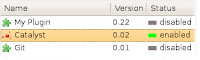 The Catalyst plugin should show up. Select it and click on the "Enable" button so its status turns green (enabled), as shown in the image above.
That's it! The plugin and all its features can be accessed through its own menu at Plugins->Catalyst:
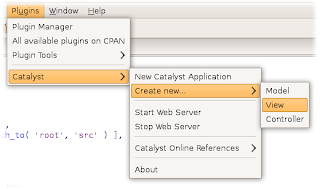
Let's browse through some of the options:
New Catalyst Application
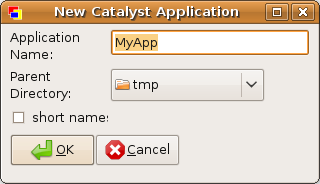
This option will create a new Catalyst application on the specified folder. You can mark the "short names" checkbox to use "M", "V" and "C" folder names instead of the recommended "Model", "View" and "Controller" names. After clicking on the "OK" button, the plugin will create a skeleton program for you and ask if you want to open the created "Root.pm" controller so you can start programming right away.
Create New -> Model
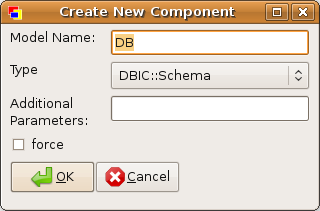
This option lets you create a new model for your application. Here, you can specify your Model's name, type, and any additional parameters needed. "Type" is a list with all helper models available on your system, for you to choose from. It defaults to mst++'s DBIC::Schema (if available), as it's considered the ORM technology of choice for Catalyst.
Create New -> View
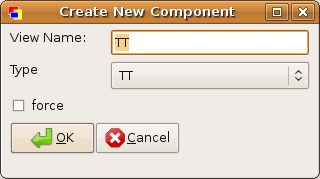
Similarly, this option will let you create a new View component for your application. "Type" defaults to the highly popular Template Toolkit helper, whenever available.
Create New -> Controller
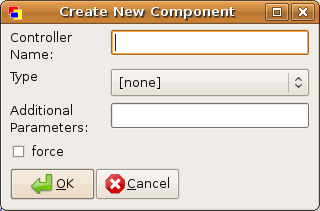
With this option, you are able to quickly create a skeleton for any controllers your application may have. The default "Type" is no type at all, but, if you do use Controller helpers, you can also specify any additional parameters for it.
Start/Stop Web Server

At any point, should you want to test-drive your web application, you can click on this option to call the yourapp_server.pl script (where "yourapp" is the name of your Catalyst application, of course), a stand-alone development web server. All the output produced by the server will be displayed right on Padre's Output window (very useful for debugging), and it will ask if you want to open your web browser to actually view your application running.
Catalyst Online References
This option has quick shortcuts to some handy developer's information links available on the Internet:
That's about it :)
Future plans include letting the developer choose its favorite types, script updating features, and much more. If you want to help, you can checkout the current code from Padre's svn repository, or give me some feedback on any bugs or feature requests via Padre's Tickets or CPAN's RT.
Let me know what you think!
One of Padre's cool features is plugins. Jq++, Alias++ and everyone else did an amazing job with the plugin API, so it's getting easier and easier to extend Padre's functionality. In fact, there are already over 20 plugins available on CPAN and many more to come. Recently, I created one myself, hoping it would improve the Padre experience and help developers of web applications, specially beginners: Padre::Plugin::Catalyst.
Installing the plugin should be fairly simple on the cpan shell
cpan> install Padre::Plugin::Catalyst
Of course, it has both Padre and Catalyst::Devel as dependencies. After installation, fire up Padre and go to the Plugins->Plugin Manager menu option.
 The Catalyst plugin should show up. Select it and click on the "Enable" button so its status turns green (enabled), as shown in the image above.
That's it! The plugin and all its features can be accessed through its own menu at Plugins->Catalyst:

Let's browse through some of the options:
New Catalyst Application

This option will create a new Catalyst application on the specified folder. You can mark the "short names" checkbox to use "M", "V" and "C" folder names instead of the recommended "Model", "View" and "Controller" names. After clicking on the "OK" button, the plugin will create a skeleton program for you and ask if you want to open the created "Root.pm" controller so you can start programming right away.
Create New -> Model

This option lets you create a new model for your application. Here, you can specify your Model's name, type, and any additional parameters needed. "Type" is a list with all helper models available on your system, for you to choose from. It defaults to mst++'s DBIC::Schema (if available), as it's considered the ORM technology of choice for Catalyst.
Create New -> View

Similarly, this option will let you create a new View component for your application. "Type" defaults to the highly popular Template Toolkit helper, whenever available.
Create New -> Controller

With this option, you are able to quickly create a skeleton for any controllers your application may have. The default "Type" is no type at all, but, if you do use Controller helpers, you can also specify any additional parameters for it.
Start/Stop Web Server

At any point, should you want to test-drive your web application, you can click on this option to call the yourapp_server.pl script (where "yourapp" is the name of your Catalyst application, of course), a stand-alone development web server. All the output produced by the server will be displayed right on Padre's Output window (very useful for debugging), and it will ask if you want to open your web browser to actually view your application running.
Catalyst Online References
This option has quick shortcuts to some handy developer's information links available on the Internet:
That's about it :)
Future plans include letting the developer choose its favorite types, script updating features, and much more. If you want to help, you can checkout the current code from Padre's svn repository, or give me some feedback on any bugs or feature requests via Padre's Tickets or CPAN's RT.
Let me know what you think!
Subscribe to:
Posts (Atom)